meShare
- 2.4
- Rating
- 100.00K
- Installs
- Free
- Price

 Analysis by App-foxy
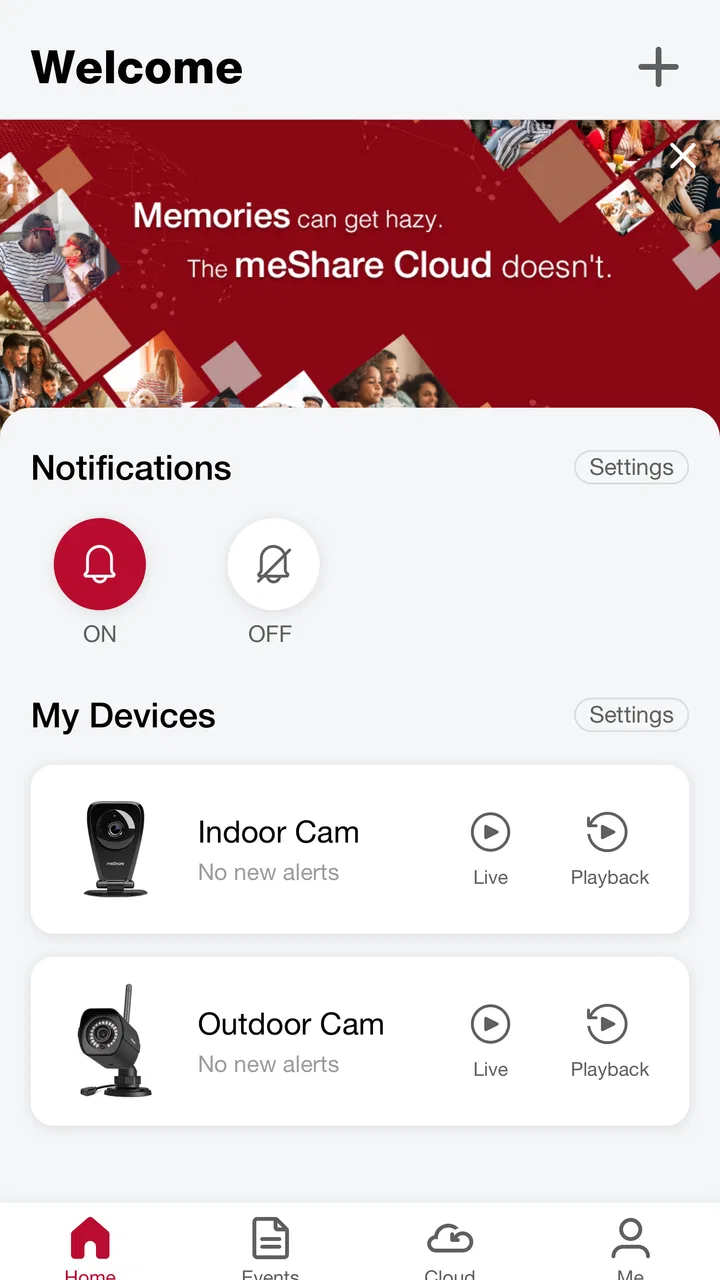
meShare is the kind of smart-home app that makes sense when your household already uses products connected to meShare’s cloud services. I found its main appeal in having one place to check and manage compatible devices instead of jumping between separate control screens. At the same time, my experience was not completely smooth: the app feels more like a practical access point for an existing ecosystem than a polished, universal smart-home command center.
That distinction matters. If you are buying a compatible product and need the companion app that ties it to remote services, meShare can be useful and straightforward enough. If you are looking for a broad platform that combines devices from many manufacturers, builds elaborate routines, or replaces every other smart-home tool, I would be more cautious. Its value depends heavily on whether the products in your home fit the meShare environment.
What using meShare is really like
The app sits in the lifestyle category, but I would describe it more specifically as a control panel for connected home products. Its job is to help you interact with supported devices and use the cloud connection behind them. That sounds simple, and in daily use, simplicity is often the right goal. I do not want a smart-home app to turn a basic check into a long configuration project.
You May Also Like

 Pandora - Music & Podcasts
Pandora’s Music Is Easy to Start, but Harder to Recover
Pandora’s strength is its low-effort path from a seed to a station. Its weak spot is how much confidence it asks you to place in connection, setup, and quiet recovery.

 AccuWeather: Weather Radar
AccuWeather Review: A Quick, Clear Forecast for Everyday Decisions
For everyday plans, the best forecast is the one you can understand quickly. AccuWeather makes rain timing, radar, and local conditions easy to act on, with a few trade-offs.

 Hill Climb Racing
Why Hill Climb Racing Still Turns Crashes Into One More Run
A tiny car, a bumpy hill and one more upgrade: Hill Climb Racing keeps resurfacing because its simple chaos makes every near-miss feel personal.

 AliExpress - Shopping App
AliExpress Makes Global Shopping Feel Personal, but Shoppers Bear the Risk
AliExpress turns a global marketplace into a pocket-sized discovery engine. Its reach is useful, its shopping loop compelling, and its trade-offs easy to miss.

 Lords Mobile: Kingdom Wars
Lords Mobile Is a Kingdom-Building Routine, Not a Quick Match
A case-by-case verdict on the building, battles, device demands, and social commitments that make Lords Mobile rewarding for some players and exhausting for others.

 PDF Scanner app - TapScanner
TapScanner Makes Paperwork Easier to Capture, Check, and Share
TapScanner makes scanning with a phone feel less like a rescue operation and more like a dependable step in getting work done. Its capture tools are useful, though not flawless.
More From Our News Desk
View All News


The first useful habit is to treat meShare as the central place for routine checks rather than opening it only during a problem. For example, before leaving home, I would use the app to review the connected products that matter to me. When returning, I could open it again instead of relying on memory about whether a device had been handled earlier. This kind of workflow is less about flashy automation and more about reducing small bits of uncertainty.
In a realistic household scenario, imagine leaving for work and suddenly wondering whether a connected product was dealt with before you walked out. The practical benefit is having a familiar app to consult rather than physically returning home. Later, if another member of the household needs access to the same setup, the app can serve as the shared point of interaction, provided the relevant products and accounts are configured for that use.
That example also reveals the app’s main limitation: meShare does not create value on its own. The experience depends on the compatible hardware, the quality of the home connection, and the reliability of the cloud service. When those pieces cooperate, the app can feel like a convenient bridge. When one of them becomes unreliable, the app is where the frustration becomes visible.
A focused companion rather than a universal platform
I would not compare meShare directly with every major smart-home platform as if they offered the same scope. A general-purpose alternative may be better for someone who wants one dashboard for products from several ecosystems, while meShare is more sensible when the home is already built around products that use its services. The trade-off is clear: a focused ecosystem can keep the experience more relevant, but it may give you less freedom when you add new hardware later.
This is one of the most important decisions to make before installing it. Do not begin with the app and assume it will organize every connected product you own. Begin with the devices you intend to control. If they are tied to meShare, the app has a clear purpose. If they are not, installing it may add another account and another control method without solving your actual problem.
I also found that a focused companion app can be easier for less technical family members than a large platform filled with unrelated settings. A person who only needs to check a connected product may prefer a smaller, more direct interface. The downside is that advanced users may notice the boundaries quickly, especially if they expect extensive cross-brand scenes, deep customization, or a highly visual overview of the entire home.
Cloud dependence changes the experience
The cloud connection is central to meShare’s purpose, so I would plan around that rather than thinking of it as a simple remote control. A command may involve the app, the internet connection, the cloud service, and the device itself. That chain is convenient when everything is working, but it also means the app cannot guarantee the same immediate feeling as a physical control located beside the device.
My practical advice is to keep a non-app fallback for anything essential. If a connected product affects access, safety, comfort, or a time-sensitive routine, do not make the phone app your only option. This is not a criticism unique to meShare; it is a sensible rule for cloud-connected home equipment. The app is best used as a convenient layer, not as the sole safeguard for an important household function.
Another useful habit is to test the app before you actually need it. Open it at home, check that the relevant product appears, and make sure you understand the basic control path. Then try the same check away from home when appropriate. Doing this early is more valuable than discovering a setup issue while standing outside the door or trying to confirm something during a busy morning.
What the current release tells me
The current version is 6.0.3.54, and the app requires Android 6.0 or later. That makes the Android requirement relatively approachable for people using older supported phones, although compatibility with the operating system alone does not guarantee that every connected product will behave identically. Hardware support and account setup remain just as important as the phone version.
The app has been available since November 18, 2014, which gives it a long presence in the connected-home space. Longevity can be reassuring for someone who wants a companion application that has not appeared only recently. Still, time on the store should not be confused with a promise of perfect modern design. My impression is that the practical quality of the experience matters more than the age of the listing.
meShare Support is the developer, and the app is free to install. That removes an obvious barrier when you are setting up a compatible product. However, the wider cost of using the ecosystem is not represented by the download itself. Hardware, connectivity, and any optional paid elements can shape the total experience, so I would not judge the app as if “free” meant that the entire smart-home setup costs nothing.
There are in-app purchases ranging from $0.99 to $399.99 per item. That is a wide range, and it is exactly why I would pay attention during setup and use. Before confirming anything paid, I would read the displayed description carefully and check whether it relates to a service or capability I actually need. A free installation can still lead to meaningful spending if the surrounding ecosystem offers optional purchases.
Where the app earns its place
The strongest case for meShare is convenience through concentration. Rather than remembering several product-specific tools, a user can return to the app associated with the meShare ecosystem. That is especially useful in homes where the connected products are used by more than one person. A shared routine is easier when everyone knows which app to open.
I also appreciate the psychological benefit of a consistent control point. Smart-home technology can become tiring when every device has its own vocabulary and navigation. A companion app that stays focused on the products it supports can reduce that mental overhead. Even if it does not offer every advanced feature found in larger platforms, it may be the better everyday choice for someone who values familiarity over experimentation.
A less obvious advantage is that the app can help separate essential household actions from entertainment-style technology. I would use it for repeatable checks and access to connected products, not as a hobby project that needs constant tuning. That approach makes the app more useful: fewer unnecessary changes, fewer forgotten settings, and a clearer idea of what the phone is supposed to do.
For families, I would establish simple conventions. Decide who handles initial setup, keep the account details organized, and show other household members the shortest route to the controls they need. Do not assume that everyone will discover the correct workflow by exploring. A few minutes of shared orientation can prevent repeated questions and accidental changes later.
The friction I would not ignore
The average rating is 2.4 from around 4.1 thousand ratings, with roughly 2 thousand written reviews. I would not treat that figure as a complete verdict, because app ratings often reflect particular devices, updates, connection conditions, and account problems. Still, it is a meaningful warning that the experience has not been consistently satisfying for everyone.
In my view, the rating makes it especially important to avoid blaming the app for every failure or excusing every failure as a hardware issue. A connected-home problem can sit anywhere between the phone, the network, the cloud service, and the device. That complexity is understandable, but it does not make the user’s frustration less real. If the app is the only visible part of that chain, it will naturally receive much of the criticism.
The most important friction is therefore dependence. If you want a control tool that remains useful when the internet is unavailable, a cloud-centered setup may not match your priorities. If you want one app to combine unrelated brands without careful checking, meShare may also feel restrictive. And if you dislike creating separate ecosystems for different rooms or products, you should confirm the compatibility path before committing.
I would also be careful about assuming that an app update automatically improves every device experience. A newer version can change navigation or behavior while the hardware remains the same. After an update, I would spend a moment checking the controls I use most often rather than waiting until an urgent situation exposes a changed workflow.
Who should install it
meShare is best for people who already own, or are specifically choosing, compatible smart-home products connected to meShare’s services. For that audience, the app has a clear job and a reasonable place in the daily routine. It is also a sensible option for households that prefer one focused companion app over a large platform with many features they will never use.
I can see it working well for a person who wants remote access without spending time building elaborate automations. It may also suit an older family member or a less technical user if the supported setup remains small and the controls are introduced clearly. The free download makes it easy to try alongside the relevant hardware, while the Everyone content rating makes it broadly approachable for household use.
I would skip it if your main goal is broad brand mixing, advanced smart-home programming, or complete independence from cloud services. In those cases, a more open platform or a product with strong local control may be a better direction. I would also avoid choosing it solely because the app itself is free; the right question is whether it fits the products and routines you actually plan to use.
For someone deciding between meShare and a usual all-in-one alternative, I would frame the choice this way: choose the broader platform when flexibility across brands is your priority; choose meShare when compatibility with its ecosystem and a focused control experience matter more. Neither approach is automatically superior. The wrong match is what creates the most annoyance.
Small habits that make setup less frustrating
Before installing, write down which household products you expect to control through the app. This simple list prevents a common mistake: assuming that every connected device will appear just because it uses the word “smart.” Then install meShare with one primary device first, confirm the basic connection, and expand gradually. A staged setup makes it easier to identify whether a problem belongs to one product or the wider account.
Use a stable home connection during initial configuration, and avoid doing the first setup while rushing out the door. Once the product appears, practice the action you care about most. If the app is mainly for checking a status, learn that view first. If it is for a repeated household task, make sure every person who needs it can reach the relevant control without assistance.
Keep purchase decisions separate from troubleshooting. If a paid option appears while you are trying to make a device work, pause and determine whether it is required for the function you expected or simply an optional addition. The in-app purchase range makes this especially worthwhile. I would rather understand the cost and purpose first than tap through a prompt just to get past a setup screen.
Finally, keep expectations realistic about response time. A cloud-connected action can be affected by more than the phone’s signal. If something does not respond, check the basic conditions calmly: is the phone online, is the home connection working, and is the device powered? This does not excuse poor reliability, but it avoids repeating the same command and creating confusion about what actually happened.
My recommendation after using it
meShare is a functional, ecosystem-focused lifestyle app with a clear strength: it gives compatible smart-home products a shared place to live on the phone. I like it most when the user has a small, well-defined setup and wants dependable familiarity rather than a huge catalog of controls. The app’s free entry point and broad age rating also make it easy to consider for ordinary household use.
My reservations are just as clear. The modest average rating, cloud dependence, possible purchase costs, and ecosystem boundaries mean I would not recommend it blindly. The app cannot be judged apart from the products and services behind it, and people who expect a universal smart-home hub may quickly find it too narrow.
For the right household, I would recommend trying it with one compatible product, learning the everyday workflow, and keeping a practical fallback for important functions. For everyone else, I would first compare the ecosystem’s compatibility and control model with a broader alternative. My final view is that meShare is worth using when it matches your hardware, but it is not a reason by itself to choose that hardware.
FAQs for meShare
01What is meShare, and what can I use it for?
meShare is a smart-home monitoring platform designed to connect compatible security cameras and related devices with your Android or iOS phone. After setting up your equipment, you can typically view live video, receive motion or activity notifications, review recorded clips, and manage camera settings remotely. The exact features available depend on your camera model, subscription plan, and the services supported in your region.
02How do I set up meShare with my security camera?
To begin, install meShare from the official Google Play Store or Apple App Store, create an account, and follow the in-app pairing instructions. You will generally need to connect the camera to a supported Wi-Fi network, scan a QR code, or enter device information manually. Keep your camera, phone, and router nearby during setup, and make sure the app has permission to use your camera, local network, and notifications.
03Does meShare require a subscription or additional payment?
The meShare app may be available to download without an upfront charge, but some features can depend on the camera service or a paid cloud-storage plan. Basic functions, such as live viewing, may be included with compatible hardware, while longer video history, cloud recording, advanced alerts, or extra storage can require payment. Check the current plan details inside the app before purchasing a subscription.
04Can I watch my cameras remotely and receive alerts?
When the camera is connected to the internet and your account is properly configured, meShare is intended to let you check live footage from outside your home. You can also enable push notifications for detected motion or other supported events. Remote access and alerts depend on a stable internet connection, correct notification permissions, camera compatibility, and the availability of the relevant meShare servers or cloud features.
05Is meShare safe to use, and what should I know about privacy?
meShare handles sensitive information because security cameras may capture activity inside or around your home. Use a strong, unique account password, enable any available security options, keep the app and camera firmware updated, and avoid sharing your login details. Before activating cloud recording or inviting other users, review the app’s privacy policy, account permissions, storage practices, and device-sharing controls.
Pros
- Simple interface makes camera feeds easy to access.
- Supports remote viewing from compatible mobile devices.
- Motion alerts can help you notice activity quickly.
- Useful for checking children
- pets
- or property remotely.
- Camera sharing allows trusted users to view selected devices.
Cons
- Requires compatible meShare camera hardware to be useful.
- Video quality depends heavily on your internet connection.
- Cloud storage and extra features may require a subscription.
- Some cameras may have limited settings inside the app.
- Background alerts can be delayed or inconsistent on some phones.

meShare
Gallery